
Adding a Forgejo Activity Feed to the Website
· 15 min read
If you read my post about moving from GitHub to Forgejo, you already know the situation. I have a Forgejo instance running on a server in my house via UmbrelOS, locked behind Cloudflare Tunnel and a Zero Trust policy. Private by design. That is the whole point.
The problem is that I also wanted my home page to show something. A contribution heat map. Recent activity. Some signal that actual work is happening beyond my local machine. GitHub gave me that for free because everything was public. Forgejo, sitting behind Zero Trust, had nothing to offer the outside world.
So I built the door myself.
Why a Worker at All
The obvious answer is “just make the instance public.” And sure, technically that works. But this instance is only for me. I do not want crawlers or LLMs indexing my repositories for their training data.
The less obvious problem is what Forgejo’s API actually returns. The raw activity feed is not fit for public consumption:
- Personal email shows up in
act_user.email,repo.owner.email, and inside GPG-signed commitPayloadstrings. - Internal hostnames leak through
ssh_urlandclone_url(thinkumbrel.local:2223). - Payload bloat: each activity event embeds the full
repoobject (~3KB) andact_userobject (~1KB). Fifty events from two repos is roughly 150KB of mostly duplicated noise. - GPG signatures in commit
Payloadfields are ~2KB each and completely useless to a UI.
A Cloudflare Worker is the cleanest solution here. It sits between the public site and my Forgejo instance, holds the auth headers so the public never sees them, reshapes the response into something lean and PII-free, and caches everything at the edge so the home page can handle anonymous traffic without hammering my home server.
The Architecture
Here is how the pieces connect:
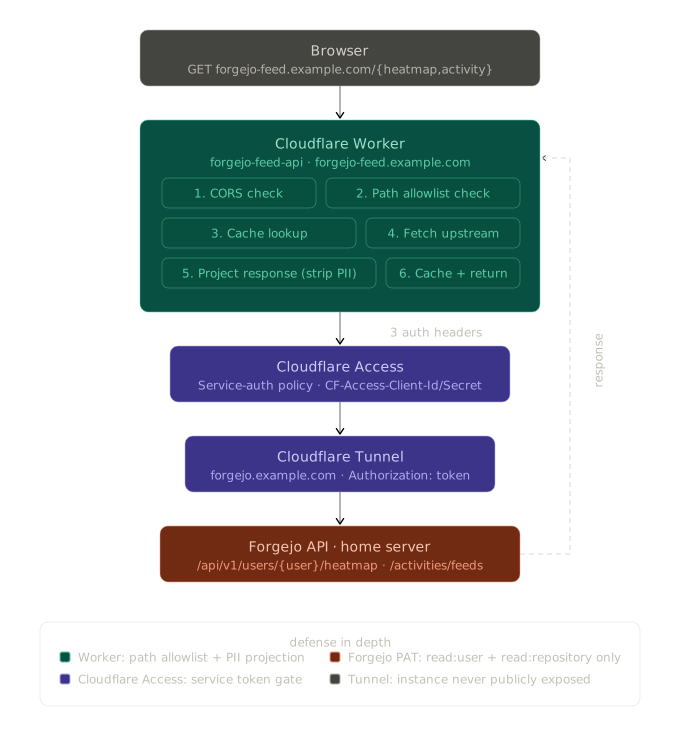
Four layers of access control, each independent:
| Layer | What it gates |
|---|---|
Cloudflare Access (service-auth policy on /api/v1/users/*) | Only the Worker (with its service token) can reach the API path. |
Forgejo PAT (read:user + read:repository) | Even with network access, the token can only read user/repo metadata. |
Worker path allowlist (/heatmap, /activity only) | The Worker will not proxy arbitrary Forgejo paths; clients cannot pivot. |
| Worker projection (strip emails, repo metadata, GPG sigs) | The public response cannot leak PII even if everything above is bypassed. |
Any one of those failing leaves the other three holding the line. That is the idea.
Step 1: Cloudflare Access Service Token
Inside the Cloudflare dashboard:
Zero Trust → Access → Applications: create a self-hosted application named forgejo-api covering the path forgejo.example.com/api/v1/users/*. The browser-facing application (the one gating the GUI with “Allow Only Me”) already exists; this is a sibling application that gates only the API path so the Worker can target it independently.
Zero Trust → Access → Service Auth → Service Tokens: create a token named forgejo-feed-worker. Cloudflare shows the Client ID and Client Secret exactly once. Save them somewhere you will not lose them.
Inside the forgejo-api application, add a policy named forgejo-feed-worker-allow with the Service Auth action and the forgejo-feed-worker token as the include rule.
That is the first gate. Nothing behind that path responds unless the request carries the matching CF-Access-Client-Id and CF-Access-Client-Secret headers.
Step 2: Forgejo Personal Access Token
Inside Forgejo (Settings → Applications → Manage Access Tokens):
- Create a token named
homepage-feed-readonly. - Scopes:
read:userandread:repository. Nothing else. - Copy the token. Forgejo only shows it once.
That is the second gate. Even with network access, this token cannot write anything or read outside user and repo metadata.
Step 3: Validate With curl Before Writing a Line of Code
Three curls, in order, to confirm each layer is doing what you think:
# No auth at all - should be blocked by Access
curl -sS -o /dev/null -w '%{http_code}\n' \
  https://forgejo.example.com/api/v1/users/<your-user>/heatmap
# expect: 403

# With all three headers - should return 200 + JSON
curl -sS https://forgejo.example.com/api/v1/users/<your-user>/heatmap \
  -H "CF-Access-Client-Id: <id>" \
  -H "CF-Access-Client-Secret: <secret>" \
  -H "Authorization: token <forgejo-pat>" \
  | jq '.[0]'
# expect: { "timestamp": <unix>, "contributions": <int> }

# The activity feed
curl -sS "https://forgejo.example.com/api/v1/users/<your-user>/activities/feeds?only-performed-by=true&limit=20" \
  -H "CF-Access-Client-Id: <id>" \
  -H "CF-Access-Client-Secret: <secret>" \
  -H "Authorization: token <forgejo-pat>" \
  | jq '.[0]'
# expect: an event object (and a noticeable amount of PII; that is why we project)
Two things worth noticing while you are here. First, Forgejo returns timestamp (singular) on heatmap points, not timestamps. The Swagger UI lies about this. Second, that activity payload is enormous. That is exactly the bloat we are going to strip in the Worker.
Step 4: Scaffold the Worker
The project structure is five files:
workers/forgejo-feed/
├── package.json
├── tsconfig.json
├── wrangler.toml
├── bun.lock
└── src/
└── index.tspackage.json:
{
	"name": "forgejo-feed-api",
	"version": "1.0.0",
	"private": true,
	"scripts": {
		"dev": "wrangler dev --env dev",
		"deploy": "wrangler deploy --env=''"
	},
	"devDependencies": {
		"@cloudflare/workers-types": "^4.20250410.0",
		"typescript": "^5.8.3",
		"wrangler": "^4.14.0"
	}
}tsconfig.json:
{
	"compilerOptions": {
		"target": "ESNext",
		"module": "ESNext",
		"moduleResolution": "bundler",
		"lib": ["ESNext"],
		"types": ["@cloudflare/workers-types"],
		"strict": true,
		"noEmit": true,
		"skipLibCheck": true,
		"forceConsistentCasingInFileNames": true
	},
	"include": ["src/**/*.ts"]
}wrangler.toml: pay attention to the routes = [] line under [env.dev]. I will come back to why that matters in Step 9.
#:schema node_modules/wrangler/config-schema.json
name = "forgejo-feed-api"
main = "src/index.ts"
compatibility_date = "2026-05-01"
workers_dev = false
preview_urls = false

[vars]
ENVIRONMENT = "production"
ALLOWED_ORIGIN = "https://example.com"
FORGEJO_HOST = "forgejo.example.com"
FORGEJO_USER = "<your-user>"

[[routes]]
pattern = "forgejo-feed.example.com"
custom_domain = true

[env.dev]
workers_dev = true
routes = []

[env.dev.vars]
ENVIRONMENT = "development"
ALLOWED_ORIGIN = "http://localhost:5173"
FORGEJO_HOST = "forgejo.example.com"
FORGEJO_USER = "<your-user>"
Start src/index.ts as a stub to verify the toolchain before doing real work:
interface Env {
	ENVIRONMENT: string;
	ALLOWED_ORIGIN: string;
	FORGEJO_HOST: string;
	FORGEJO_USER: string;
	FORGEJO_TOKEN: string;
	CF_ACCESS_CLIENT_ID: string;
	CF_ACCESS_CLIENT_SECRET: string;
}

export default {
	async fetch(request: Request, env: Env): Promise<Response> {
		return new Response(JSON.stringify({ ok: true, env: env.ENVIRONMENT }), {
			headers: { 'Content-Type': 'application/json' }
		});
	}
} satisfies ExportedHandler<Env>;
Install and check:
cd workers/forgejo-feed
bun install
bunx wrangler dev --env dev
# in another shell:
curl -sS http://localhost:8787 | jq
# expect: {"ok": true, "env": "development"}
If you see that JSON, the toolchain is wired.
Step 5: Heatmap Endpoint
The heatmap is the easy one. The upstream response is already clean. The Worker’s job is just to fetch with the three auth headers, filter to the last 365 days, and pass the rest through.
type HeatmapPoint = {
	timestamp: number;
	contributions: number;
};

async function fetchFromForgejo(path: string, env: Env): Promise<Response> {
	const url = `https://${env.FORGEJO_HOST}${path}`;
	return fetch(url, {
		headers: {
			'CF-Access-Client-Id': env.CF_ACCESS_CLIENT_ID,
			'CF-Access-Client-Secret': env.CF_ACCESS_CLIENT_SECRET,
			Authorization: `token ${env.FORGEJO_TOKEN}`,
			Accept: 'application/json'
		}
	});
}

async function buildHeatmap(env: Env, origin: string): Promise<Response> {
	const upstream = await fetchFromForgejo(`/api/v1/users/${env.FORGEJO_USER}/heatmap`, env);
	if (!upstream.ok) return json({ error: 'UPSTREAM_ERROR' }, 502, origin);
	const raw = (await upstream.json()) as HeatmapPoint[];
	const oneYearAgo = Math.floor(Date.now() / 1000) - 365 * 24 * 60 * 60;
	const projected = raw.filter((p) => p.timestamp >= oneYearAgo);
	return json(projected, 200, origin);
}
The json() helper just wraps new Response(JSON.stringify(body), { ... }) with the right CORS headers.
Step 6: Activity Endpoint With Projection
This is where the actual work lives. The Worker takes the raw activity feed and remaps each event into a slim shape that only contains what the UI needs.
Define the projected types first:
type PRDigest = {
	number: string;
	title: string;
};

type ActivityEvent = {
	id: number;
	op_type: string; // "commit_repo" | "merge_pull_request" | "create_pull_request" | "delete_branch" | ...
	created: string; // ISO 8601
	repo: string; // "johndoe/www" (full_name only)
	ref?: string; // "main" / "v1.2.3" (refs/heads|tags prefix stripped)
	commit_message?: string; // first line of the first commit, on op_type === "commit_repo"
	pr?: PRDigest; // on merge_pull_request or create_pull_request
};
Two small helpers that handle Forgejo-specific quirks:
function parseRef(refName: string): string | undefined {
	if (!refName) return undefined;
	if (refName.startsWith('refs/heads/')) return refName.slice('refs/heads/'.length);
	if (refName.startsWith('refs/tags/')) return refName.slice('refs/tags/'.length);
	return refName;
}

function parseFirstCommitMessage(content: string): string | undefined {
	try {
		const parsed = JSON.parse(content) as { Commits: Array<{ Message: string }> };
		const first = parsed.Commits[0]?.Message;
		return first ? first.split('\n')[0].trim() : undefined;
	} catch {
		return undefined;
	}
}

function parsePRContent(content: string): PRDigest | undefined {
	try {
		const parsed = JSON.parse(content) as [string, string];
		return { number: parsed[0], title: parsed[1] };
	} catch {
		return undefined;
	}
}
The route handler itself is mostly plumbing:
async function buildActivity(env: Env, origin: string): Promise<Response> {
	const upstream = await fetchFromForgejo(
		`/api/v1/users/${env.FORGEJO_USER}/activities/feeds?only-performed-by=true&limit=20`,
		env
	);
	if (!upstream.ok) return json({ error: 'UPSTREAM_ERROR' }, 502, origin);
	const raw = (await upstream.json()) as RawActivityEvent[];
	const projected: ActivityEvent[] = raw.map((e) => {
		const event: ActivityEvent = {
			id: e.id,
			op_type: e.op_type,
			created: e.created,
			repo: e.repo.full_name
		};
		const ref = parseRef(e.ref_name);
		if (ref) event.ref = ref;
		if (e.op_type === 'commit_repo') {
			const message = parseFirstCommitMessage(e.content);
			if (message) event.commit_message = message;
		}
		if (e.op_type === 'merge_pull_request' || e.op_type === 'create_pull_request') {
			const pr = parsePRContent(e.content);
			if (pr) event.pr = pr;
		}
		return event;
	});
	return json(projected, 200, origin);
}
After projection, a delete_branch event is ~120 bytes instead of ~5KB, and there is nowhere left in the payload for an email or GPG signature to hide.
One thing I learned the hard way while wiring the SvelteKit side: the parsePRContent gate needs to cover create_pull_request too, not just merge_pull_request. Forgejo emits the same [number, title] content shape for both event types. Without that one-line addition, “opened PR” events fell through to a generic fallback in the UI. Easy fix, annoying to discover at 2300.
I also went through two rounds of trimming on the projection itself. The first version returned richer types: repo was an object with { name, full_name, html_url }, ref was an object with { name, type }, and commits was an array with sha/author_name/timestamp/message. All of that was defensible as data, but when I wired the UI to consume it, exactly one field per type was actually rendered. The html_url field was particularly convincing in my head; I figured I would link from the activity feed directly to each repo in Forgejo. But the instance is private, so any link from a public page leads to a 403 for anyone who is not me. The right call was to render repo names as styled <span> elements, and once that landed, html_url had no consumer.
Not gonna lie, YAGNI applies to API shapes too. Project to the call site, not to your imagination.
Step 7: Edge Caching
Two reasons to cache here: anonymous homepage traffic should not fan out to the origin once per visitor, and Forgejo activity changes on the order of hours, not seconds.
async function withCache(
	request: Request,
	ctx: ExecutionContext,
	origin: string,
	build: () => Promise<Response>
): Promise<Response> {
	const cacheKey = new Request(request.url, { method: 'GET' });
	const cache = caches.default;
	const cached = await cache.match(cacheKey);
	if (cached) return withCors(cached, origin);
	const response = await build();
	if (!response.ok) return response;
	response.headers.set('Cache-Control', 'public, s-maxage=600');
	response.headers.delete('Set-Cookie');
	ctx.waitUntil(cache.put(cacheKey, response.clone()));
	return withCors(response, origin);
}
Two non-obvious things here.
response.headers.delete('Set-Cookie') is load-bearing. Cloudflare Access attaches a CF_Authorization JWT cookie on every authenticated response, including service-token responses. Without that delete, every public visitor would receive a cookie scoped to my CF Access account. Strip it.
caches.default is a no-op in wrangler dev local mode. It silently returns undefined from match and silently ignores put. To actually exercise the cache before deploying, use wrangler dev --remote --env dev, which runs against real Cloudflare infrastructure. Cache behavior is invisible locally, full stop.
Step 8: Smoke Test Against the Real Edge
Set the dev secrets first. These go to a separate Wrangler secret store named after the dev env’s worker (forgejo-feed-api-dev):
cd workers/forgejo-feed
bunx wrangler secret put FORGEJO_TOKEN --env dev
bunx wrangler secret put CF_ACCESS_CLIENT_ID --env dev
bunx wrangler secret put CF_ACCESS_CLIENT_SECRET --env dev
Run remote dev and exercise the endpoints:
bunx wrangler dev --remote --env dev

# Heatmap
curl -isS http://localhost:8787/heatmap | head -10
curl -sS http://localhost:8787/heatmap | jq 'length'

# Activity, with a PII grep
curl -sS http://localhost:8787/activity > /tmp/activity.json
grep -iE 'gmail|@johndoe|noreply|umbrel\.local|ssh_url|clone_url|act_user|"email"|gpg|payload' /tmp/activity.json \
  && echo "FAIL: leak found" || echo "OK: no PII leak"

# Cache + Set-Cookie
curl -isS http://localhost:8787/heatmap | grep -iE 'cf-cache-status|cache-control|set-cookie'
Expect a 200 with Cache-Control: public, s-maxage=600, no Set-Cookie, and OK: no PII leak. The CF-Cache-Status header should flip to HIT after the first call.
Step 9: The Route Inheritance Gotcha
This is the one part of the build that genuinely surprised me, so it gets its own section.
My first attempt at wrangler dev --remote --env dev returned a 502 Bad Gateway from Cloudflare’s edge, not from the Worker itself. The 502 response body referenced forgejo-feed.example.com, which I had not provisioned yet. Something was clearly wrong upstream.
The Cloudflare dashboard for the dev worker (forgejo-feed-api-dev) showed:
- Worker URL: Inactive at
forgejo-feed-api-dev.<account>.workers.dev - Route:
forgejo-feed.example.com/*attached to the dev worker - Custom Domain:
forgejo-feed.example.comalso on the dev worker
Two problems. The Worker URL toggle being off meant wrangler dev --remote had nowhere to land its preview. And both the production route and the production custom domain had been attached to the dev worker.
Root cause: in wrangler.toml, the top-level [[routes]] block is inherited by [env.dev] unless you explicitly override it. When Wrangler uploaded the dev preview, it dutifully wired up the production route pattern to the dev worker. Not ideal.
The fix is one line:
[env.dev]
workers_dev = true
routes = []     # explicitly clear inherited routes
Then in the dashboard: remove the route and custom domain from the dev worker, and toggle Worker URL to Active. After that, the smoke test went green.
The general rule with Wrangler v4: inheritable keys (routes, workers_dev, compatibility_date) flow from the top-level config into each [env.*] unless you set them explicitly. When the dev env is meant to be isolated, set routes = [] and workers_dev = true explicitly. Consider yourself warned.
Step 10: Production Deploy
Production has its own secret store. Set them once (no --env flag):
cd workers/forgejo-feed
bunx wrangler secret put FORGEJO_TOKEN
bunx wrangler secret put CF_ACCESS_CLIENT_ID
bunx wrangler secret put CF_ACCESS_CLIENT_SECRET
Then deploy:
bun run deployWrangler uploads the worker as forgejo-feed-api, provisions the custom domain forgejo-feed.example.com from the [[routes]] block, and creates the proxied DNS record automatically. The deploy output confirms it:
Deployed forgejo-feed-api triggers (4.46 sec)
  forgejo-feed.example.com (custom domain)
Step 11: Verify Production
Wait for DNS to resolve, then run through the same suite:
# Endpoints
curl -isS https://forgejo-feed.example.com/heatmap | head -10
curl -sS https://forgejo-feed.example.com/heatmap | jq 'length'
curl -sS https://forgejo-feed.example.com/activity | jq '.[0]'

# Cache transition
curl -isS https://forgejo-feed.example.com/heatmap | grep -iE 'cf-cache-status'
sleep 2
curl -isS https://forgejo-feed.example.com/heatmap | grep -iE 'cf-cache-status'

# CORS preflight
curl -isS -X OPTIONS \
  -H "Origin: https://example.com" \
  -H "Access-Control-Request-Method: GET" \
  https://forgejo-feed.example.com/heatmap | head -10

# Path allowlist
curl -isS https://forgejo-feed.example.com/api/v1/users/<your-user>/heatmap | head -3
# expect: 404

# PII + Set-Cookie scan
curl -sS https://forgejo-feed.example.com/activity > /tmp/prod-activity.json
grep -iE 'gmail|@johndoe|noreply|umbrel\.local|ssh_url|clone_url|act_user|"email"|gpg|payload' /tmp/prod-activity.json \
  && echo "FAIL" || echo "OK no PII"
curl -isS https://forgejo-feed.example.com/heatmap | grep -i 'set-cookie' \
  && echo "FAIL" || echo "OK no Set-Cookie"
All green: 200 OK with proper cache headers, Access-Control-Allow-Origin: https://example.com on the preflight, CF-Cache-Status: HIT on the second call, a 404 on the blocked path, and both PII checks passing.
What Is Next
The homepage widget landed in a separate piece of work: a SvelteKit +page.server.ts that fetches both endpoints at build time, an ActivityPanel Svelte component that renders the heatmap and a five-item activity feed, and Paraglide message keys to localize the verb phrases.
A few decisions from that side fed back into the Worker (which is why the projection went through two rounds of trimming, as described in Step 6):
The build-time fetch lives in a server-only load (+page.server.ts), not a universal one. Universal loads re-run on the client during hydration, and the prod Worker’s Access-Control-Allow-Origin: https://example.com blocks that re-run from any non-prod origin (localhost, preview environments, all of them). A separate onMount revalidate inside ActivityPanel.svelte handles client-side freshness explicitly: same fetch, same .catch(() => null), but scoped to the component instead of replacing the whole page’s data prop.
Day-of-week and month labels in the heat map come from Intl.DateTimeFormat({ timeZone: 'UTC' }) rather than Paraglide messages. Native Intl handles all locales, and the UTC anchor keeps month boundaries from shifting based on the visitor’s timezone.
A few things I left out of this round but might revisit: a Forgejo webhook that calls cache.delete() on push so the homepage reflects new commits sub-TTL, a RATE_LIMITER binding if the endpoint ever sees unexpected traffic volume, and per-repository PAT scoping once Forgejo v15.0+ is running here.
Wrap Up
Four layers of access control sounds like overkill until you remember that any one of them can be misconfigured. Cloudflare Access gates the network path. The scoped PAT gates what authenticated requests can do. The Worker’s path allowlist gates what clients can ask the Worker to proxy. The projection gates what the response can contain. They are independent, and they compound.
The two things I would call out for anyone replicating this: the Set-Cookie delete is non-negotiable (do not skip it), and the Wrangler route inheritance gotcha will cost you time if you have not seen it before (now you have).
The home server stays private. The home page has something to show.
Until next time,
Cody